
Allegro Ads campaign pacing: how to spread your daily budget over the day
A daily budget that runs out at 15:00 isn't working during the evening peak, when shoppers buy the most. Budget spending pace in Mink lets you set how much of the budget can be spent by a given hour. That way, money is left for the best hours.
- You turn on pacing in a manual campaign, in the Campaign budget ("Budżet kampanii") section, with the Budget spending pace ("Tempo wydawania budżetu") toggle.
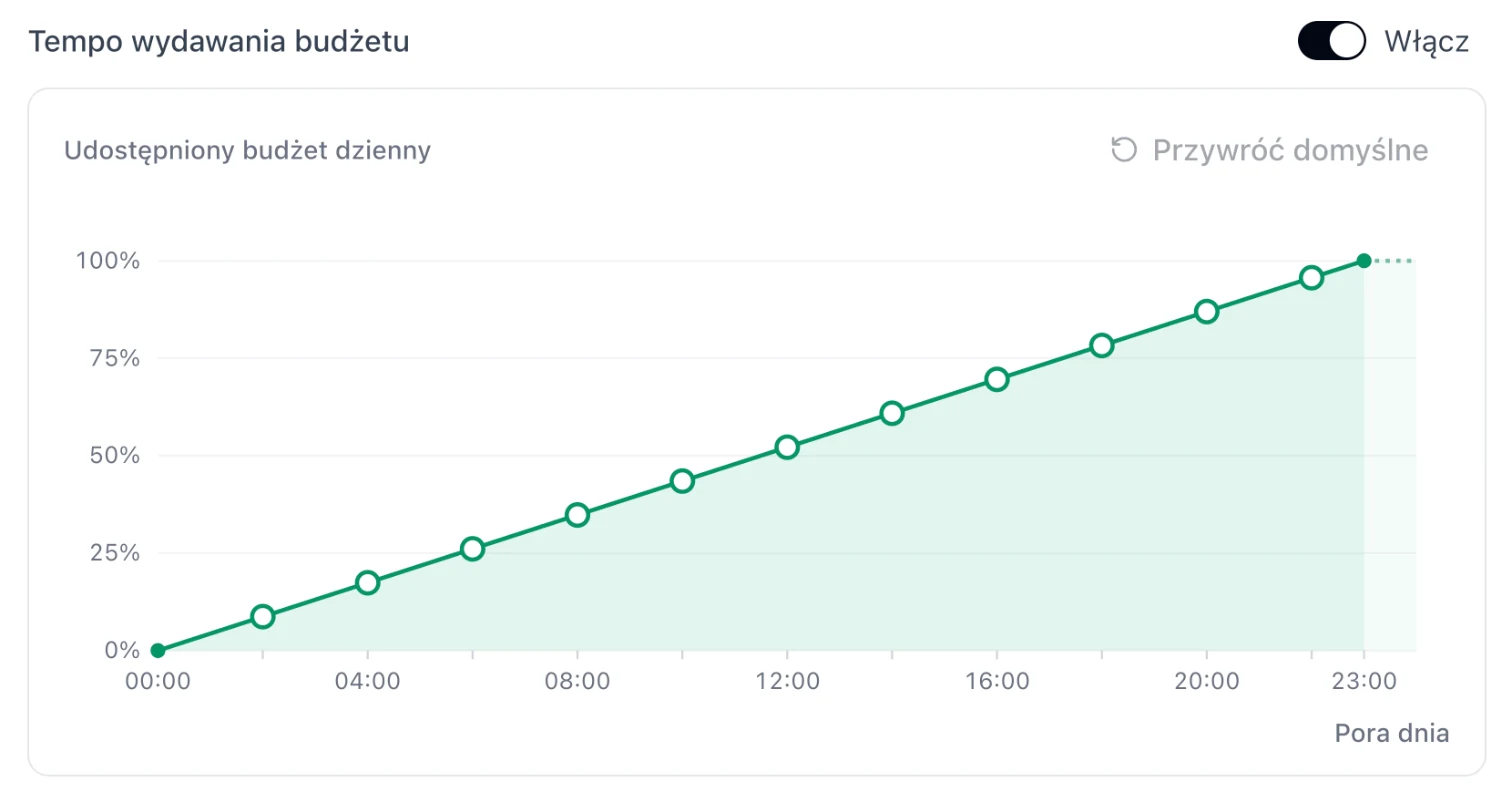
- The chart shows what percentage of the daily budget can be spent by a given hour.
- By default, the budget is spread evenly. You move the points (every 2 hours) with the mouse or the arrow keys.
- Restore defaults ("Przywróć domyślne") returns to an even distribution.
What pacing is
Pacing, or budget spending pace, controls when during the day a campaign spends its daily budget. Without it, a campaign with popular offers can use up the whole budget by the afternoon and stop showing in the evening, when sales are highest.
With pacing, you set a limit for each time of day, e.g. "spend at most 55% of the budget by 18:00". The rest waits for the evening.
How to read the chart
The Released daily budget ("Udostępniony budżet dzienny") chart is cumulative. The horizontal axis is the time of day (from 00:00 to 23:00), and the vertical axis is the percentage of the daily budget that can be spent by that hour.
- A straight line from 0% to 100% is an even distribution (the default setting): a similar share of the budget is released every hour.
- A flat segment means no new budget is released during those hours.
- A steep segment means a lot of budget is released during those hours.
Example: a daily budget of 150 PLN and the point "18:00 · 55%" mean that the campaign can spend at most 82.50 PLN by 18:00. The remaining 67.50 PLN is left for the evening.
Step-by-step setup
-
Open a manual campaign
Create a new manual campaign or click Edit ("Edytuj") next to an existing one. Set a daily budget, because that is what pacing distributes.
-
Turn on Budget spending pace
In the Campaign budget section, below the CPC bid, switch the Budget spending pace toggle to On ("Włącz"). A chart with an even distribution appears.
-
Shape the curve
Drag the points (every 2 hours) up or down. You can also click a point and change its value with the arrow keys, 1 percentage point at a time. A tooltip shows the hour and value, e.g. "18:00 · 55%". The curve can't go down: a later hour always has at least the same percentage as an earlier one.
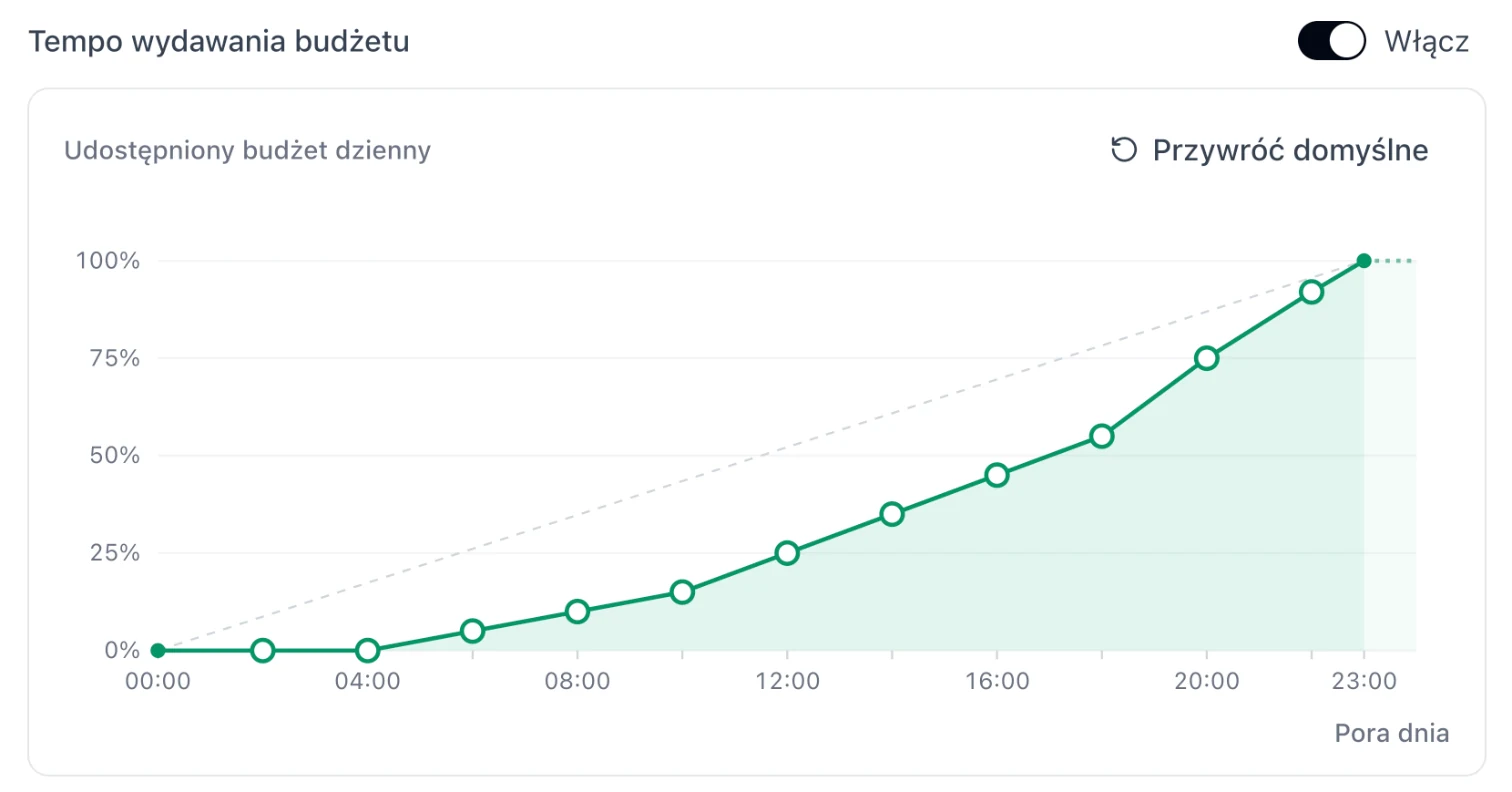
A curve for the evening peak: at most 25% of the budget by 12:00, 55% by 18:00, and 45% left for 18-23. The dashed line is the default distribution. -
Save the campaign
Click Add campaign ("Dodaj kampanię") for a new campaign or Save changes ("Zapisz zmiany") when editing. To go back to an even distribution, click Restore defaults or turn off the toggle.
A free audit shows campaigns that are losing money and the ones selling at a profit. The profitable ones benefit most from pacing.
5 ready-made curves
Match the hours to your own sales. The easiest way to check them is the Best sales hours ("Najlepsze godziny sprzedaży") map on the Dashboard. Read more about it in the article on schedules.
1. Evening peak
04:00 0% · 08:00 10% · 12:00 25% · 16:00 45% · 18:00 55% · 20:00 75% · 22:00 92%
The most common setup in e-commerce. In the morning the campaign spends sparingly, and almost half of the budget is left for 18-23.
2. No spending at night
00:00-06:00 0%, then evenly up to 100% at 23:00
Budget doesn't leak on night-time clicks and is spread evenly during the day. A simpler alternative to a night pause in a schedule.
3. Lunch break and evening
10:00 15% · 14:00 40% · 18:00 55% · 22:00 95%
Steep segments around 11-13 and 19-22, flat ones in the morning and afternoon. Works for categories people buy during work breaks and in the evening.
4. Business hours
06:00 0% · 08:00 10% · 12:00 50% · 16:00 90% · 18:00 100%
For products bought by businesses: the budget is spent during office hours, and after 18:00 there's nothing left to spend.
5. Even
Restore defaults
A good starting point when you don't yet know how your sales are spread across the day, or when the budget doesn't run out before the evening anyway.
Pacing vs. schedule: which to choose?
| Budget spending pace | Schedule | |
|---|---|---|
| What you set | How much of the daily budget can be spent by a given hour. | Campaign status, CPC or budget changes on selected days and hours. |
| Scope | One curve per day, in the campaign settings. | A weekly grid, a separate schedule for multiple campaigns. |
| Best when | The budget runs out too early, but the bids are fine. | You want to pay more at peak times, less at night or differently on weekends. |
You can combine both tools: pacing makes sure the budget lasts until the evening, and a schedule raises CPC during peak hours.
Common mistakes
- A curve that's too flat in the morning with a low budget. If the campaign doesn't spend its whole budget anyway, pacing won't improve anything. Check the CPC bid first. The suggestion CPC too low to win traffic ("CPC zbyt niski, by wygrywać ruch") shows which campaigns are losing auctions.
- 100% long before the end of the day. If the curve reaches 100% at 16:00, the campaign can spend everything before the evening. That only makes sense for B2B sales.
- Judging after one day. Sales vary from day to day. Compare at least 2 weeks before and after the change.