
Allegro Ads automations: rules that watch your campaigns every day
Checking ROAS, lowering bids and switching off offers that only cost money is daily work. A Mink automation does it for you: you set an "if..., then..." rule once, and Mink checks the results every day and makes the changes.
- An automation is a set of rules: conditions (e.g. ROAS below 100% over the last 14 days) and actions (e.g. lower CPC by 10%).
- It works on selected campaigns, on all active campaigns, or on all offers.
- It runs once a day between 11:00 and 23:00 and evaluates full days, ending with yesterday.
- Before you turn a rule on, you can check in Change preview ("Podgląd zmian") what it would change.
What an automation does
An automation is a set of rules that Mink checks every day based on campaign or offer results. Example: if ROAS over the last 7 days is below 100%, lower CPC by 10%. It works like a specialist who reviews your account every day and makes the same well-considered fixes.
Available actions:
- change the daily budget,
- change the total budget,
- change CPC,
- stop the campaign,
- for offers: exclude the offer from ads.
An automation is different from a schedule. A schedule works by the hour, and an automation works by results. They work best together.
Step-by-step setup
-
Add an automation
In the menu, choose Automations ("Automatyzacje") and click Add automation ("Dodaj automatyzację"). Enter a name that says what the rule does, e.g. "Exclude offers with no sales", and choose the currency for thresholds and amount changes.
-
Choose the scope
- Selected campaigns ("Wybrane kampanie"): only the campaigns you pick.
- All active campaigns ("Wszystkie aktywne kampanie"): every campaign that is on in the account.
- All offers ("Wszystkie oferty"): the rule evaluates each offer separately and can exclude it from ads.
For campaigns, you also set the frequency ("częstotliwość"): "Change the same campaign no more often than every N days" ("Zmieniaj tę samą kampanię nie częściej niż co N dni").
-
Add rules: conditions and actions
In the If (all conditions) ("Jeśli (wszystkie warunki)") section you add conditions, and in the Then ("Wtedy") section you add actions. All conditions in one rule must be met at the same time. The screenshot shows a rule for offers: ROAS below 100% and more than 20 clicks over the last 14 days, then the offer is dropped from ads.
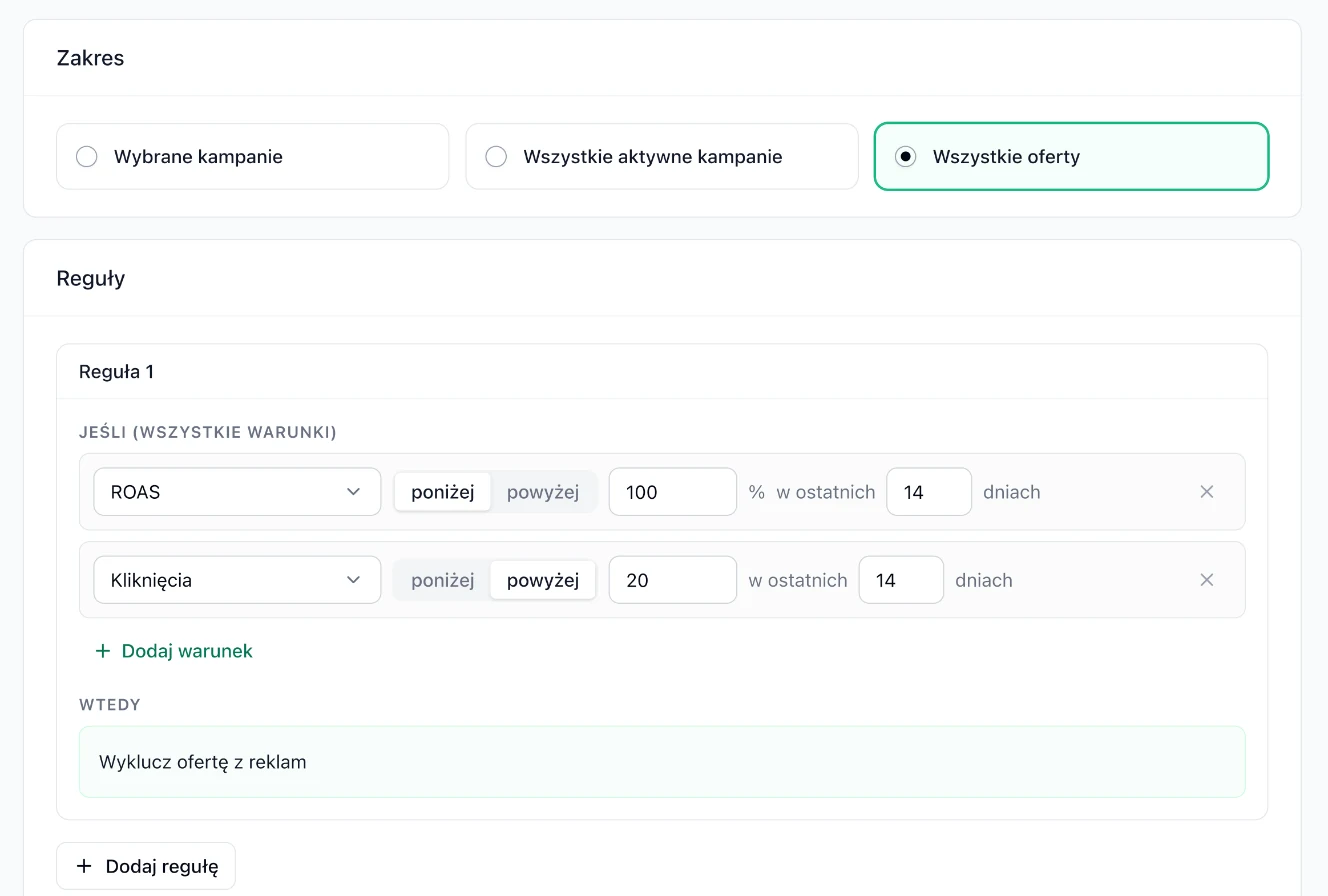
A rule for offers: ROAS below 100% and more than 20 clicks in 14 days, then Exclude offer from ads ("Wyklucz ofertę z reklam"). -
Create it and check the preview
Click Create ("Utwórz"). Then open the automation, go to the Change preview tab and click Show preview ("Pokaż podgląd"). You'll see which campaigns or offers meet the conditions and what would be changed. The preview doesn't change anything.
Conditions and actions
In conditions, you compare a result with a threshold (above or below) over the last N days. The options include:
- ROAS: return on ad spend,
- cost and clicks,
- CTR: the share of impressions that turn into clicks,
- daily budget exhausted: useful for scaling campaigns that sell well but run out of budget every day.
You set CPC and budget changes as Decrease ("Zmniejsz") or Increase ("Zwiększ"), by a percentage or an amount.
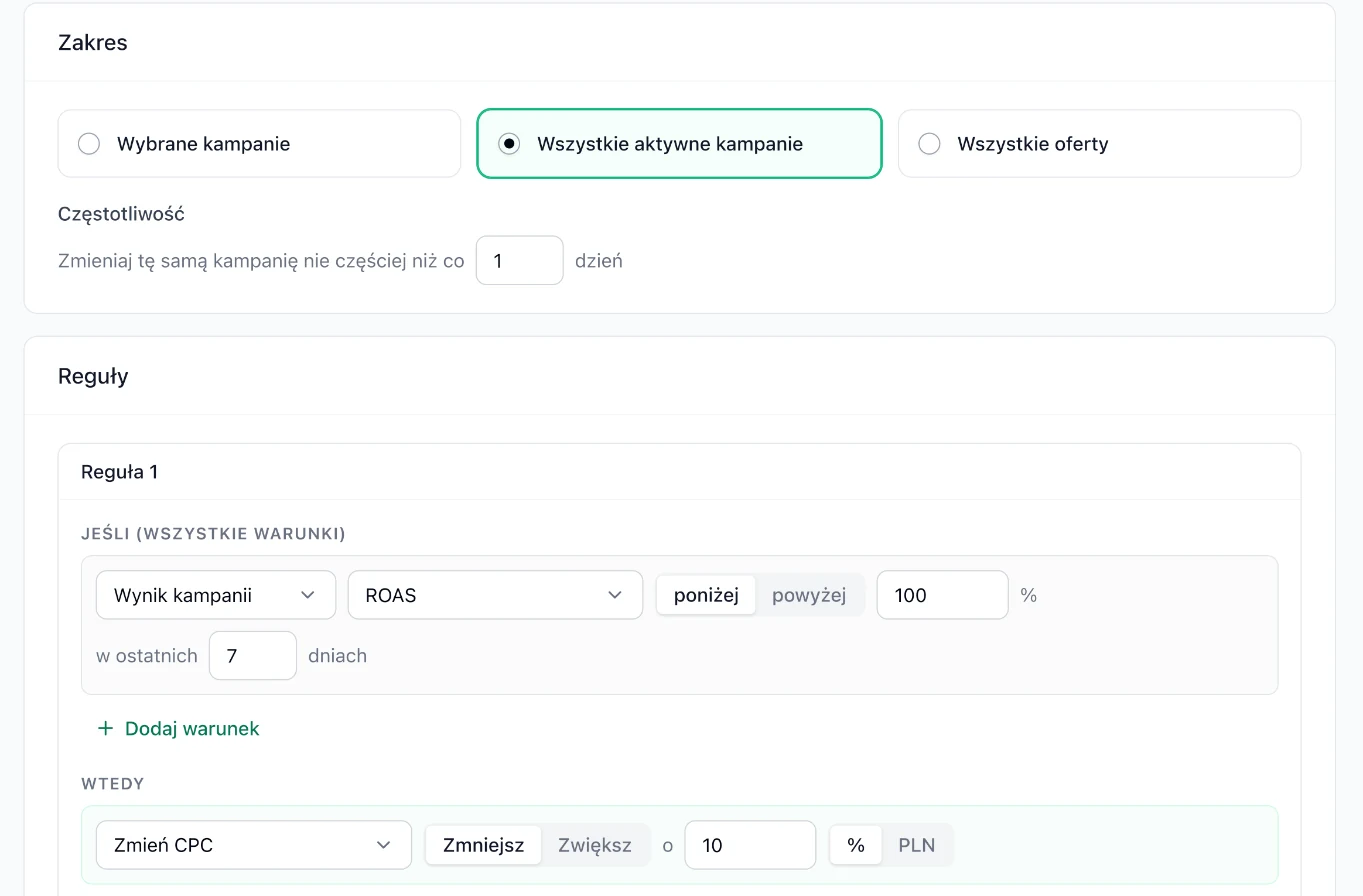
Several rules in one automation: Mink applies the first rule whose conditions are met. So put the strictest rule (e.g. stopping the campaign) first, and the milder ones (e.g. lowering CPC) below it.
When an automation runs
- An active automation runs once a day between 11:00 and 23:00 Polish time.
- It evaluates results from full days, ending with yesterday. Today's statistics are not taken into account, because they are still changing.
- The "Change the same campaign no more often than every N days" setting protects against changes that are too frequent. Give the campaign time to show the effect of the previous change.
- The Run now ("Uruchom teraz") button runs the automation right away and skips the frequency limit.
A free audit calculates your break-even point from your margin and shows the campaigns and offers below it. Those are ready-made thresholds for your rules.
6 ready-made rules
Adjust the thresholds to your margin. A campaign starts making money when ROAS exceeds the break-even point: with a 25% margin that's 400% (100% / 25%), with a 40% margin it's 250%.
1. Exclude offers with no sales
All offers · ROAS below 100% and clicks above 20 in 14 days · Exclude offer from ads
An offer that gets lots of clicks but whose sales don't even cover the ad cost eats budget that better offers could use. The clicks condition protects offers that have only just started showing.
2. Lower CPC when ROAS is low
All active campaigns · ROAS below break-even in 7 days · CPC -10% · no more often than every 3 days
A gentle correction instead of switching off. Limiting it to once every 3 days gives the campaign time to respond after each change.
3. Scale campaigns that are short on budget
Selected campaigns · ROAS above 800% in 7 days and daily budget exhausted · daily budget +20%
The campaign sells at a high profit, but runs out of budget every day. The rule adds budget only when both conditions are met.
4. Boost campaigns with a good CTR
Selected campaigns · CTR above 3% and ROAS above 600% in 14 days · CPC +10%
A high CTR and a profitable ROAS mean the ad is reaching the right people. A higher bid will bring more impressions in better placements.
5. Emergency brake
All active campaigns · cost above 300 PLN and ROAS below 50% in 7 days · Stop campaign ("Zatrzymaj kampanię")
Protects you from a campaign that spends a lot and sells almost nothing. The automation will never turn it back on, so the decision to resume stays with you.
6. Steps: stop first, then adjust
Rule 1: ROAS below 50% · Stop. Rule 2: ROAS below 300% · CPC -10%
Mink applies the first matching rule, so very weak campaigns are stopped, and the ones that are only somewhat weaker get a lower bid.
Preview and run history
In the Run history ("Historia uruchomień") tab, each run has a time, a type (scheduled or "Run now") and a status. Click Show decisions ("Pokaż decyzje") to see the result for each campaign or offer with the "before → after" change.
| Decision | What it means |
|---|---|
| Conditions not met ("Warunki niespełnione") | Results didn't cross the thresholds, or data was missing. |
| Skipped - changed recently ("Pominięto - zmieniona niedawno") | The campaign was changed within the period set in the frequency. |
| Not applicable ("Nie dotyczy") | The action can't be applied, e.g. the campaign is already paused or doesn't have that budget. |
| Applied with limit ("Zastosowano z limitem") | The change was capped at the allowed value. |
Common mistakes
- Too short a data window. ROAS from 2-3 days can be random. For decisions about excluding offers, 14 days works better.
- No condition on the number of clicks. Without it, the rule may exclude an offer after just a few clicks, before it had a chance to sell.
- Changes that are too frequent. Changing CPC in the same direction every day adds up quickly. Set the frequency to 2-3 days.
- Expecting the automation to turn a campaign on. An automation can only stop a campaign. It also covers only campaigns that are on and currently running.
- A manual change that "disappears". An automation changes settings the same way you do. If the conditions are met again, it may change your value again.