
AI agent campaigns in Allegro Ads: you set the budget, the agent handles offers and CPC
An agent campaign is the simplest way to run ads in Allegro Ads. You enter the budget and dates, and the AI agent picks the offers, CPC bids and budget split on its own. It never spends more than you set.
- You set the name, marketplaces, dates and budget (daily or total). The agent picks the offers, CPC and budget split.
- The agent never increases the budget you set.
- An optional target ROAS tells the agent when to push for sales and when to focus on profitability.
- The agent usually reviews the campaign every 12 hours. You'll see every change in the Agent activity ("Aktywność agenta") window.
What an agent campaign is
It's a campaign run by an AI agent. You decide how much you want to spend and how long the campaign should run. The agent decides which offers to advertise, how much to pay per click and how to split the budget. You don't set CPC bids, because the agent manages them.
It's a good choice when you don't have the time or experience to watch bids every day, but you want your ads to work from day one.
Step-by-step setup
-
Choose the "Agent" type
In Campaigns ("Kampanie"), click Add campaign ("Dodaj kampanię") and choose Agent ("Agent"). Enter a name and choose the marketplace.
-
Set the duration and budget
Enter the start date and, if you want, the end date. Set a daily or total budget. Optionally, enter a target ROAS ("Docelowy ROAS").
-
Decide how products are selected
With Agent's choice ("Wybór agenta"), you can save and launch the campaign right away with the Save and launch ("Zapisz i uruchom") button. With Manual selection ("Wybór ręczny"), you first pick the offers.
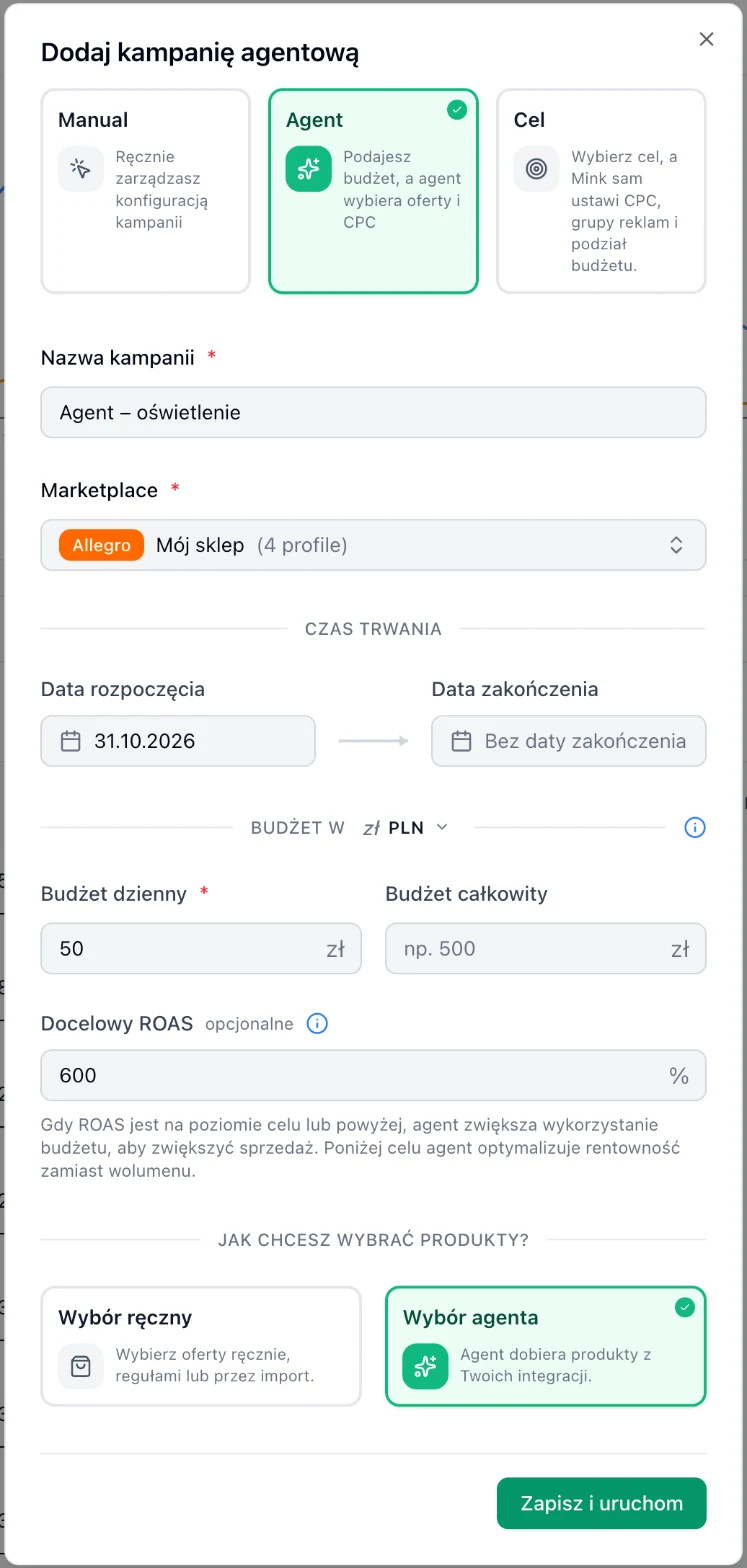
Agent campaign: daily budget 50 PLN, target ROAS 600% and products selected by the agent.
Agent's choice or manual selection?
| Method | How it works | When to choose it |
|---|---|---|
| Agent's choice | The agent picks products from your integrations on its own. | To get started, when you don't know which offers to advertise. |
| Manual selection | You pick the offers (manually, with rules or by import), and the agent chooses from them. It may advertise only some of them. | When the campaign should cover a specific category, brand or list of offers. |
| Manual selection + Bestsellers | The agent advertises only the offers selected every day as bestsellers. | When you want to focus the budget on what already sells. |
What target ROAS is for
Target ROAS is the return on ad spend the agent should maintain:
- ROAS at or above the goal: the agent spends more of the budget to grow sales.
- ROAS below the goal: the agent focuses on profitability instead of volume.
- Empty field: the agent maximizes ROAS without a specific goal.
It's best to set the goal above your break-even point, which is 100% divided by your margin. With a 20% margin that's 500%, with 30% it's about 330%.
A free audit shows the ROAS of your campaigns and the break-even point based on your margin. That way you can give the agent a realistic goal.
What the agent changes and when
- The agent reviews the campaign usually every 12 hours, sometimes less often, at most every 3 days.
- After you change the budget, dates or offers, it recalculates the campaign sooner.
- Not every run changes something. If the campaign is doing well, the agent may leave it as is.
- In the campaign table, click the View agent activity ("Zobacz aktywność agenta") icon next to the campaign name. The Agent activity window shows every change the agent has made.
You stay in control. You turn the campaign on or off with the status toggle, and you change the budget and end date in the campaign table or in the edit form. The agent won't restart a paused campaign on its own.
Use cases
First campaign on a new account
Agent's choice · daily budget 50 PLN · no target ROAS
The agent finds offers with potential on its own. After 2-3 weeks, the activity window shows what it advertises, and you can add a target ROAS.
Sales only above your margin
Agent's choice · daily budget 100 PLN · target ROAS 600%
With a margin of about 20%, break-even is 500%. A 600% goal means the agent adds budget only where advertising makes money.
Agent in a single category
Manual selection (filters: category) · daily budget 60 PLN
You limit the agent to a chosen category, e.g. a new product line. The agent decides which of those offers to advertise and at what price.
Agent on bestsellers
Manual selection → Bestsellers · daily budget 80 PLN · target ROAS 500%
Mink picks the best-selling offers every day, and the agent sets their bids. You don't need to update the offer list.
Prefer to decide on bids yourself? See manual campaigns. Want to choose a specific goal, e.g. stock clearance? See goal campaigns.