
Goal campaigns: Visibility, Stock clearance and Target ROAS in Allegro Ads
Don't want to set bids, ad groups and budget splits every day? In a goal campaign you tell Mink what you want to achieve and how much you can spend, and Mink picks the settings and checks them every day.
- You choose the goal, budget, dates, marketplaces and offers. Mink sets the CPC, ad groups, budget split and placements.
- Goals: Visibility ("Widoczność"), Stock clearance ("Wyprzedaż stanów", Allegro only) and Target ROAS ("Docelowy ROAS").
- Mink sets up the campaign right after you create it and after every change, then checks it once a day, just after midnight.
- You can't change the goal of an existing campaign. You also can't assign a schedule to a goal campaign.
What a goal campaign is
It's a campaign where you choose the goal, budget and dates, and Mink sets the CPC bids, ad groups, budget split and placements on its own. You decide on the goal and the budget, and Mink decides how to reach it.
You set yourself:
- the name, dates, budget and marketplaces,
- the offers to advertise (except with the Stock clearance goal),
- the goal value, if the selected goal needs one, e.g. target ROAS.
You can turn the campaign on or off at any time.
Which goal to choose
| Goal | What Mink does | When to choose it |
|---|---|---|
| Visibility | Tries to get as many impressions as possible within the budget. | New products, entering a new category, building brand awareness. |
| Stock clearance | Advertises offers with low stock at the minimum CPC. You enter the maximum offer stock. Allegro only. | End-of-line items, seasonal sales, freeing up warehouse space. |
| Target ROAS | Sets bids and ad groups to get close to the return on ad spend you entered. For example, 450% means 4.50 PLN in sales from 1 PLN of cost. | Your core assortment, when you know your margin and profitability matters. |
Goals that aren't available for the selected marketplaces are grayed out in the form.
Step-by-step setup
-
Choose the "Goal" type
In Campaigns ("Kampanie"), click Add campaign ("Dodaj kampanię") and choose Goal ("Cel"). Enter a name, choose the marketplace and the campaign goal, then click Next ("Dalej").
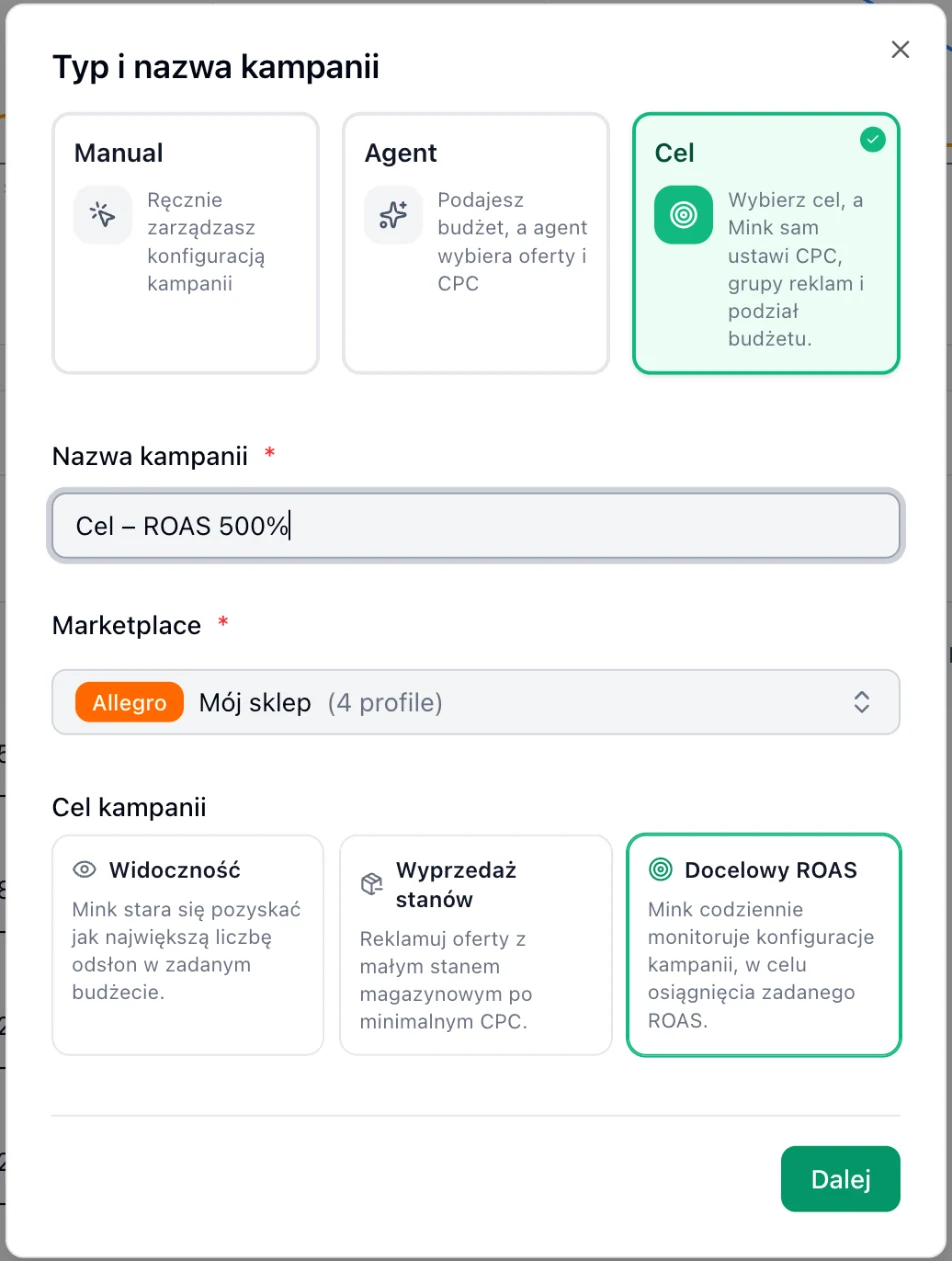
Choosing the "Goal" type and the campaign goal: Visibility, Stock clearance or Target ROAS. -
Fill in the form
Set the dates and the goal value (e.g. target ROAS 500%), choose the offers and the budget: daily, total or both. Click Add campaign.
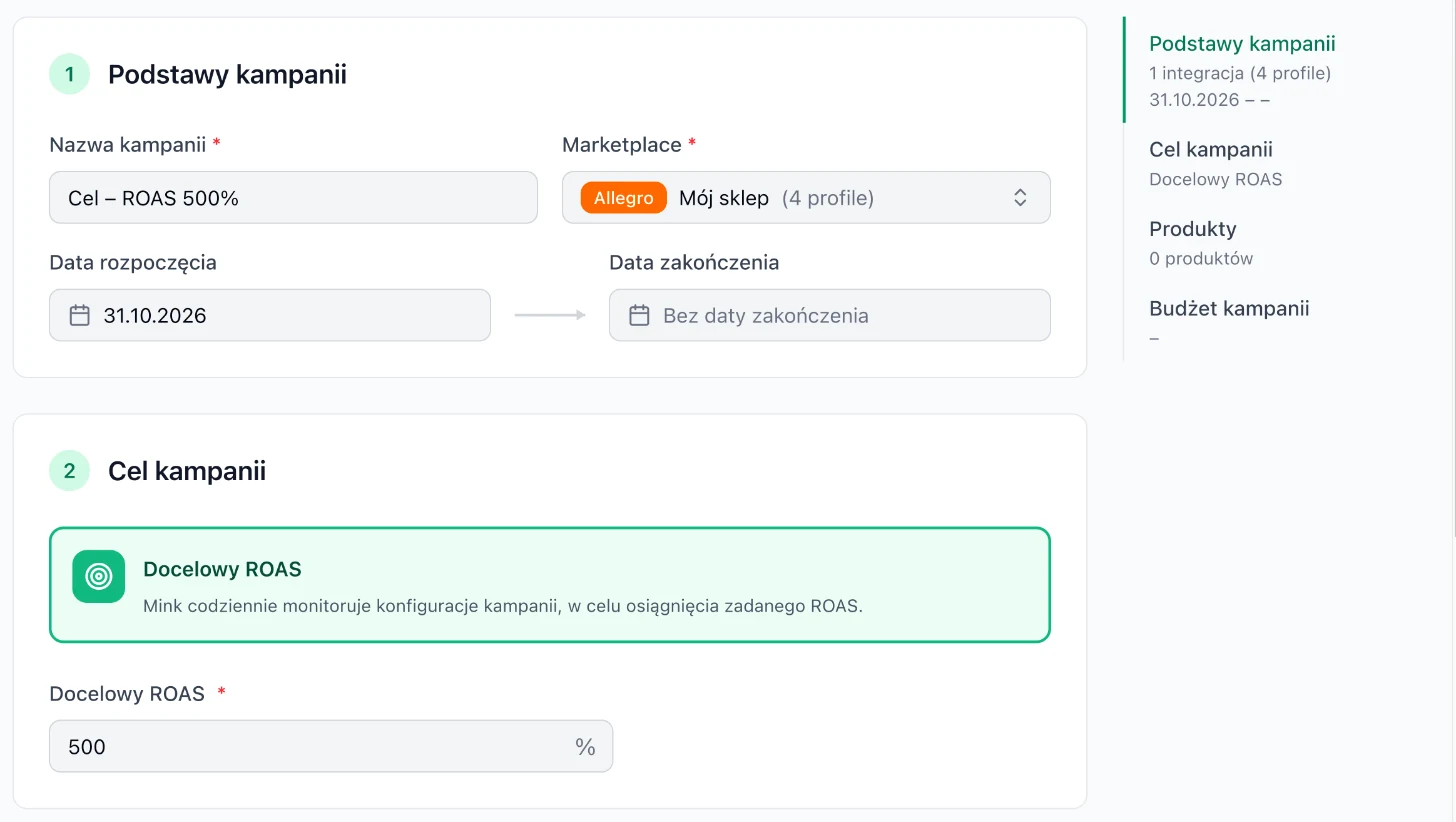
Goal campaign form with Target ROAS 500%. On the right, the summary: basics, goal, products and budget.
How to set target ROAS
- Calculate your break-even point from your margin: 100% divided by your margin. With a 25% margin, the campaign is profitable from ROAS 400%.
- Set the goal above break-even, but keep it realistic. A good starting point is the ROAS these offers achieve today. A goal much higher than current results usually limits reach and sales.
- Give the campaign a few days. Mink bases its decisions on results from previous days. When there is little data, it may deliberately leave bids unchanged.
A free audit shows the ROAS of each campaign and the break-even point based on your margin. It's a good basis for setting target ROAS.
How Mink changes a goal campaign
- It prepares the first settings right after the campaign is created and after every change you make.
- After that, it checks the campaign once a day, just after midnight.
- It bases decisions on results from previous days, so you'll see the effects after a few days.
- Mink doesn't guarantee reaching the goal. The goal is the direction it adjusts the settings toward.
A goal campaign can't have a schedule, because Mink manages its bids and budget. It doesn't appear in the list when you choose campaigns for a schedule.
Use cases
Launching a new collection
Goal: Visibility · daily budget 50 PLN · 14 days
New offers don't have a sales history yet. First, they need impressions. After two weeks, move the best ones to a campaign with the Target ROAS goal.
End-of-line items before the season
Goal: Stock clearance · max offer stock 5 pcs · total budget 300 PLN
Mink picks the low-stock offers itself and advertises them at the minimum CPC. You don't choose offers manually, and the total budget caps the cost of the promotion.
Core assortment with a known margin
Goal: Target ROAS 500% · margin 25% (break-even 400%) · daily budget 100 PLN
The campaign should sell at a profit, not sell as much as possible. A 500% goal leaves headroom above break-even.
A whole category without watching bids
Goal: Target ROAS 450% · offers selected with a category filter · daily budget 150 PLN
Instead of running several manual campaigns with different bids, you let Mink set CPC, ad groups and budget split across the whole category. You keep an eye on the goal and the budget.
Goal, agent or manual?
| Manual | Agent | Goal | |
|---|---|---|---|
| You set | offers, CPC, budget, placements | budget, dates, optionally offers and target ROAS | goal, budget, dates, offers |
| Mink sets | nothing, unless you add a schedule or an automation rule | offers, CPC, budget split | CPC, ad groups, budget split, placements |
| How often it changes | only when you change it | usually every 12 h | once a day after midnight |
More: manual campaigns and AI agent campaigns.